Case studies
eCommerce
Case studies
eCommerce

Sensez: A Shopify Product Quiz App, Built End to End

WHAT WE BUILT:The Shopify app, the storefront quiz, the result page engine, billing and the sensez.io website
SYSTEM STATE:Live on the Shopify App Store since May 2026, and still in active development with us
Shopify
Platform

A Shopify app, live on the Shopify App Store

Sensez: Product Quiz & Upsell, published on 15 May 2026

View on the App Store

Proof in production

What changed
A merchant goes from install to a live quiz that fills the store's cart, without a developer or theme code
What we built
A Shopify app with a no-code builder, three result page types, subscriptions, four ways to publish and Shopify billing
What's protected
Subscription checkouts that never mix in old cart items, sold-out products hidden by default, and embeds limited to allowed domains
01

A product quiz that ends in the store's own Shopify cart

Sensez is a Shopify app for product quizzes. A shopper answers a few questions and gets a result page with the products that fit, and one click puts them in the store's cart, as a one-time purchase or a subscription.
Lazy Ants built every part described below and keeps developing it with the Sensez team. The app has been on the Shopify App Store since 15 May 2026. Any merchant can install it, start a free trial and build a quiz alone, or ask for one built for them.

From quiz to Shopify cart

  1. 01The shopper answers a few questions
  2. 02Each answer adds tags or picks products
  3. 03Exclusions remove what the shopper ruled out
  4. 04The result page fills from the merchant's layout
  5. 05One click puts the products in the Shopify cart
Every response also reaches the store's analytics, email and ad tools
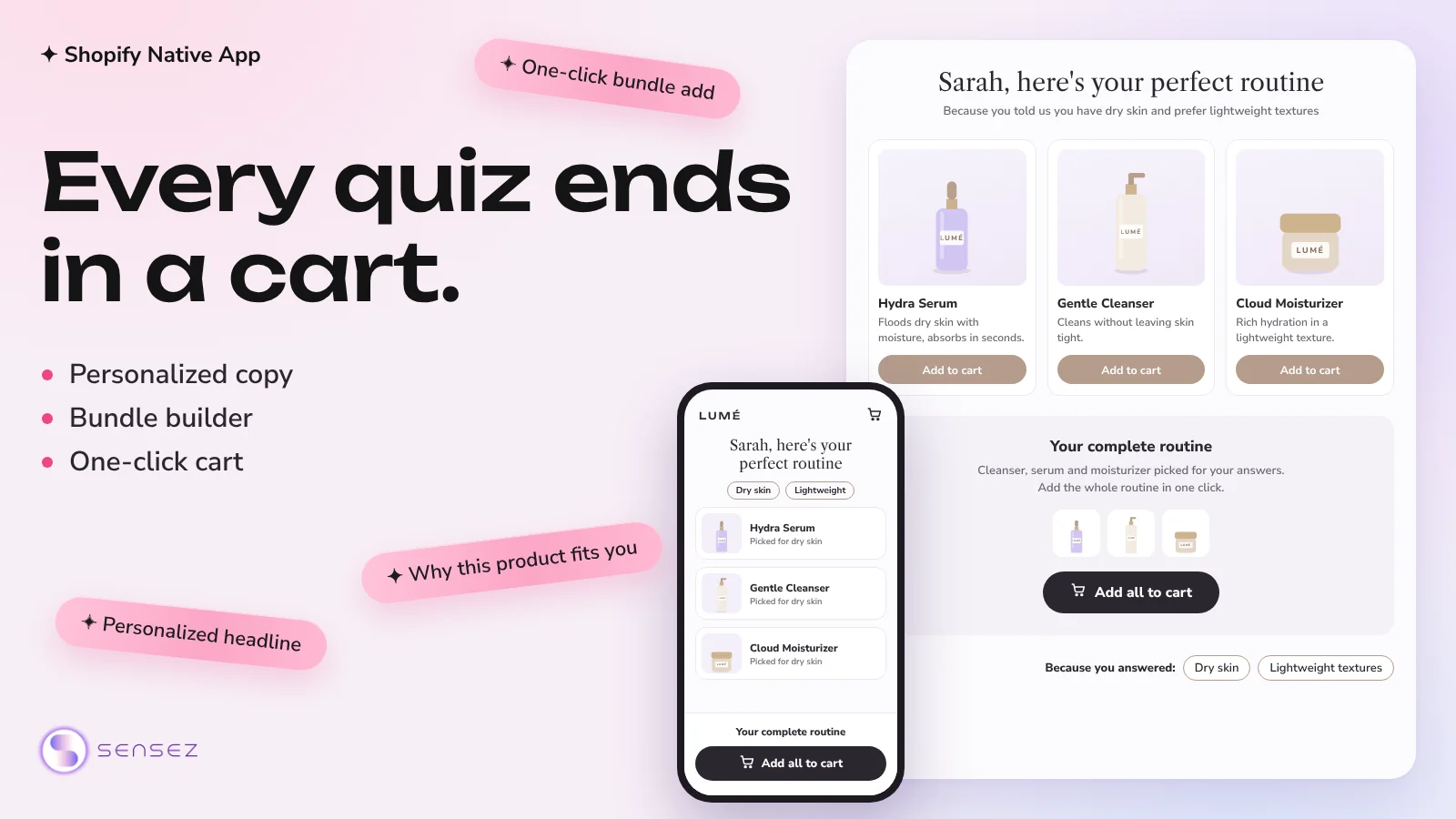
A Sensez quiz result with matched products and an add all to cart button
A quiz result that ends in the cart. Image from the Sensez listing on the Shopify App Store.
02

What a Shopify quiz app has to do

In Sensez the result page is where the sale happens. It reads the store's products, stock and subscription plans from Shopify and puts the right items in the cart.
Every merchant also has to be able to install it and set it up alone, without a developer and without editing theme code.

What can break in a quiz app

  • A subscription checkout that still carries old items from the cart
  • Sold-out products recommended on the result page
  • A published quiz that breaks because its type was switched
  • The quiz copied onto a website the merchant does not own
  • A quiz that quietly disappears from the store when a plan ends

What the app had to cover

  • A no-code builder inside Shopify admin, with branching questions
  • Result pages for small catalogs, tiered bundles and large catalogs
  • One click that adds a whole pack to the store's cart, once or on subscription
  • A quiz that runs inside the theme, on its own page, in a popup or on another website
  • Analytics, lead capture and the merchant's own marketing tools
  • Plans, trials and usage limits billed through Shopify
03

Three ways to sell, chosen when the quiz is created

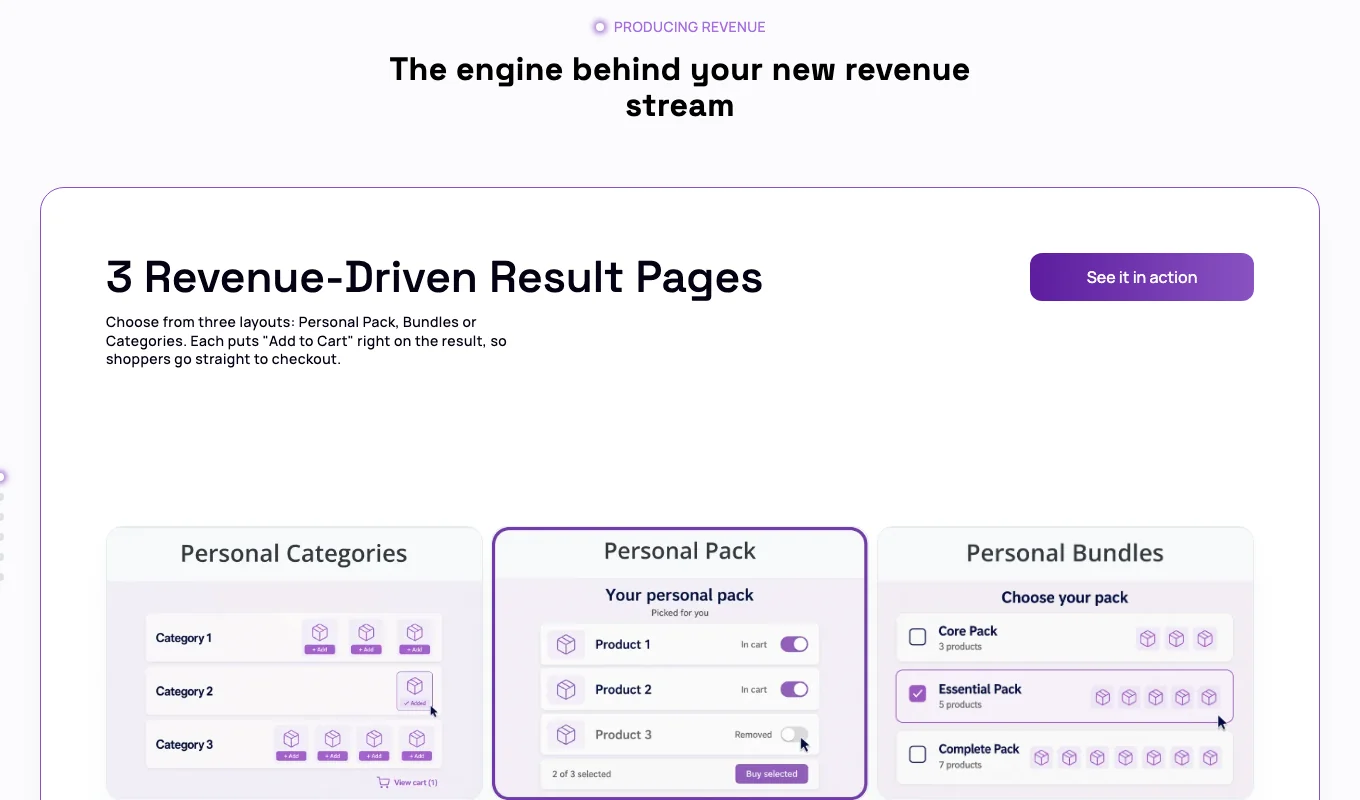
Catalogs sell differently, so Sensez has three result page types. Personal Pack gives each shopper one curated set. Personal Bundles offers up to three packs at different price levels. Personal Categories shows matched product categories and subscription boxes, for stores with large catalogs.
The merchant picks the type when creating a quiz, and it cannot be changed later. Each type links answers to products differently: Personal Pack attaches products to answers, the other two use tags. To use another type, the merchant creates a new quiz.
The three Sensez result page types: Personal Categories, Personal Pack and Personal Bundles
The three result page types, as sensez.io presents them.

How each type picks products

  1. 01Personal Pack: each answer adds its own products to the pack, every product once
  2. 02Personal Bundles: products carry matching tags and a pack level, and each pack includes the one below it
  3. 03Personal Categories: categories and subscription boxes appear when their tags match the shopper's answers
04

Answers carry tags, and an exclusion always wins

In Bundles and Categories quizzes, each choice answer can add tags and exclude tags. The answers build a tag profile, and the result page shows only what matches it.
When one answer adds a tag and another excludes it, the exclusion wins. If the answer "I am vegan" excludes the tag contains-collagen, no category or subscription box with that tag appears, whatever else the shopper picked. Tags belong to the store, so all its quizzes share one list.

How the result page picks and orders items

  • Categories: featured first, then Top, Mid and Low priority, then by name
  • Products inside a category, cheapest first
  • Subscription boxes in one row after the first category
  • One marketing banner per shopper, the one that matches most of their tags
05

A builder a merchant runs without a developer

The builder lives inside Shopify admin. A merchant adds questions, connects answers to products or tags, sets branching rules and sees them on a flow diagram, and lays out the result page from sections.
Every change saves on its own, and the preview matches the store: the storefront draws the result page from the same layout the merchant built.
Works with
  • Shopify admin
  • Google Fonts
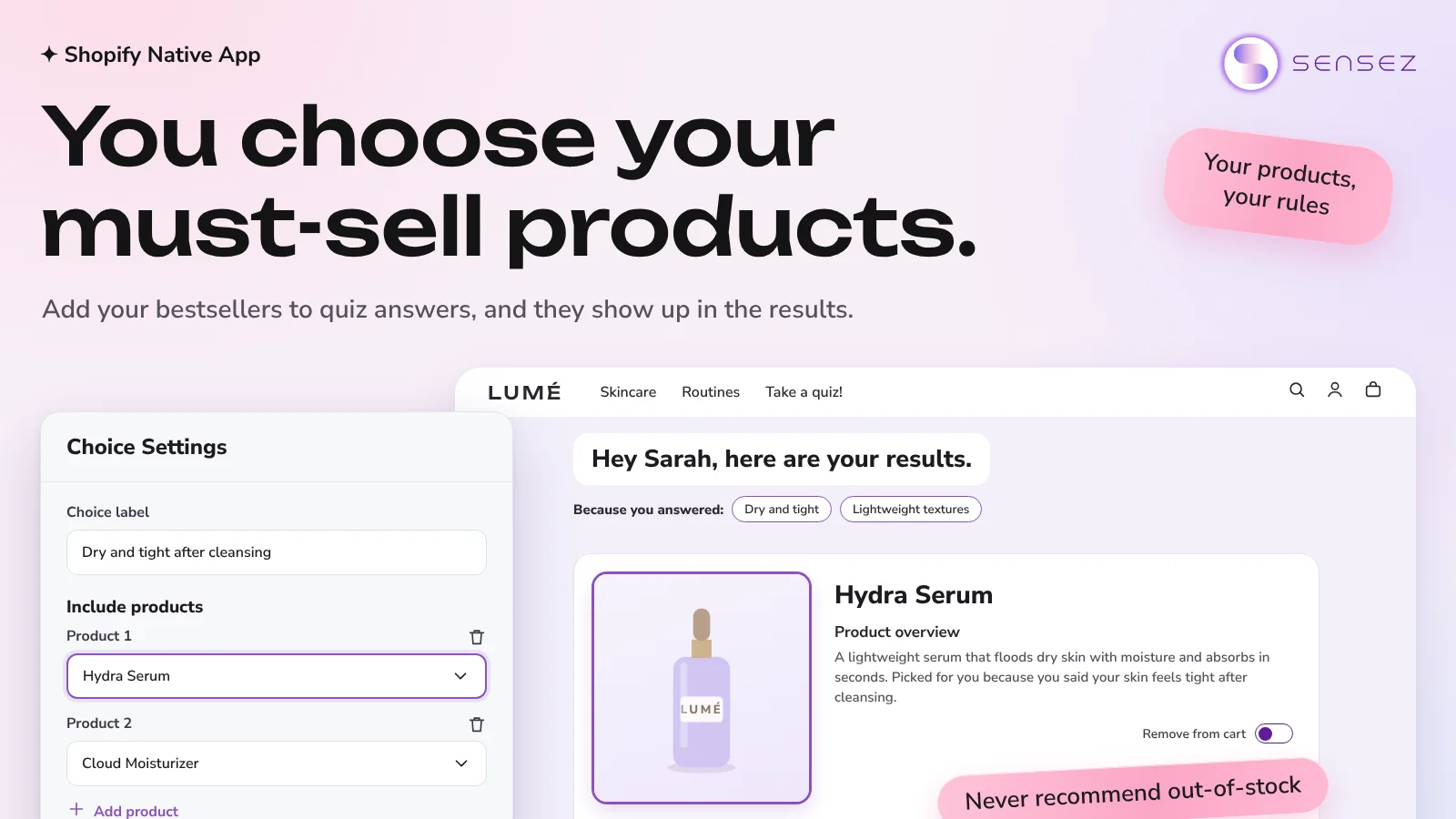
The Sensez builder with an answer's Include products settings next to the result page
In the builder, an answer picks the products it adds to a Personal Pack. Image from the App Store listing.

What the builder includes

  • Eight question types, from image answers to email, phone and file upload
  • Branching rules with AND and OR conditions and a default path for every question
  • A result page editor with header, goals, expert, banner, personal text and product sections
  • A design editor with saved colors, Google Fonts and styles for every answer state
  • Desktop and mobile preview of the quiz and its result page
06

From the result page to the Shopify cart in one click

The result page sells through the store's own Shopify cart. A pack goes into the cart as a one-time purchase or on subscription, and a Categories result adds products one at a time.
Subscribe appears only when every product in the pack has a Shopify subscription plan. It empties the cart first, so the checkout holds only the subscription. A one-time purchase keeps whatever was already in the cart.
Sells through
  • Shopify cart
  • Shopify subscriptions
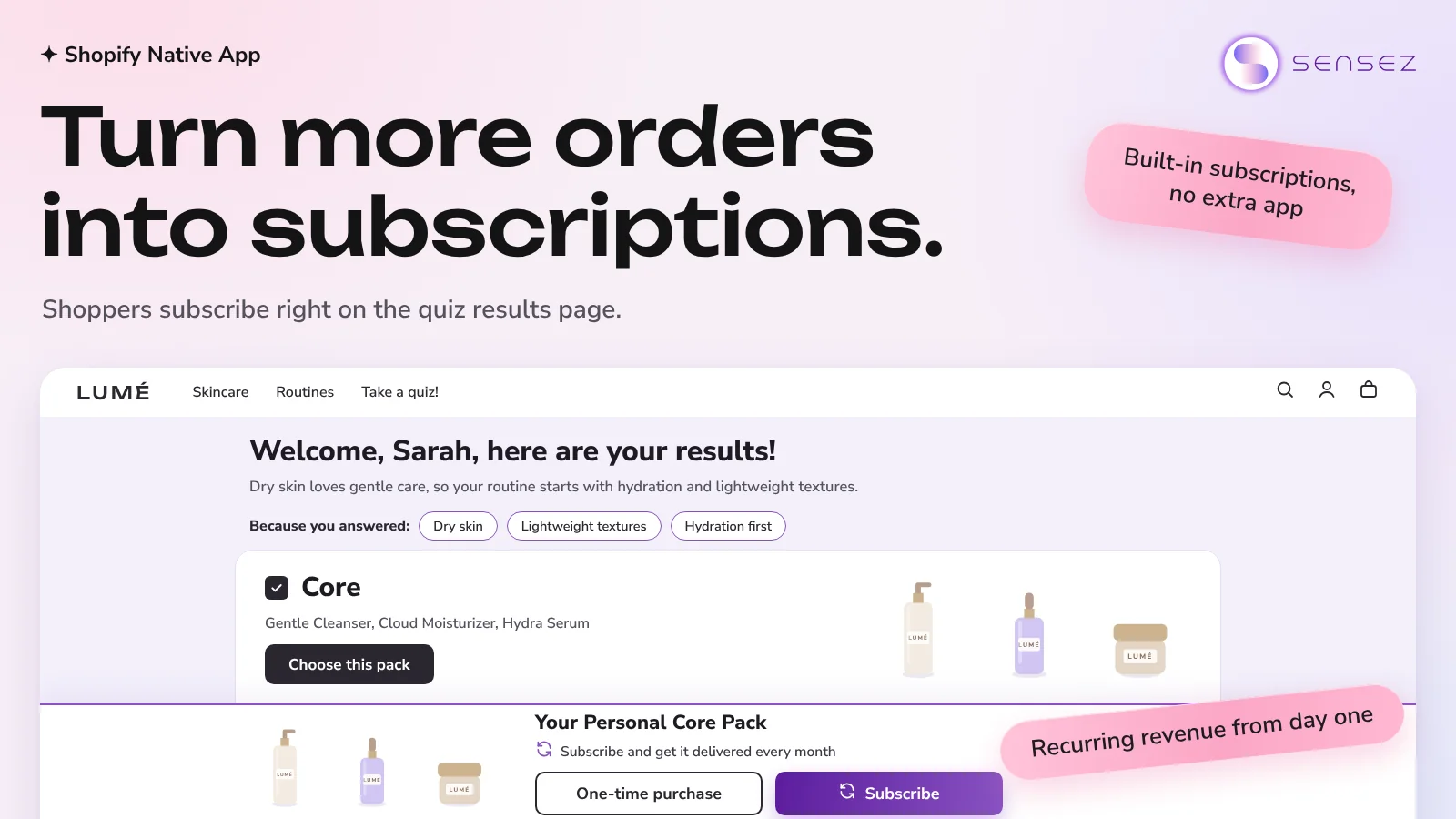
A Sensez pack on the result page with One-time purchase and Subscribe buttons
A pack with One-time purchase and Subscribe on the result page. Image from the App Store listing.

Rules that keep the cart predictable

  • Stock comes from Shopify's "available for sale" status, and sold-out products are hidden by default
  • Each subscription box gets its own Shopify product and subscription plan when it is created
  • After adding, the theme's cart drawer opens, or the cart page if the theme has no drawer
  • Merchants see and cancel shopper subscriptions from the order in Shopify admin
07

Four ways to publish a quiz without editing the theme

A merchant publishes a quiz from the app in four ways: as a block inside a store page, as its own page in the store, as a popup, or on a website outside Shopify.
The Inline Quiz is an app block the merchant adds in the theme editor, and the popup is an app embed they switch on there. Both come from a Shopify theme app extension, so the theme's code stays untouched. The popup opens on a click, after a delay, on scroll or on exit intent. Embed by code runs the quiz on another website, and only domains on the merchant's allowed list can load it. Every purchase ends at the store's own checkout.

Publishing options

  1. 01Widget to website: the Inline Quiz block on any page of the theme
  2. 02In-store page: a ready quiz page with the store's header and footer
  3. 03Open in a popup: the Sensez Quiz Popup app embed with automatic triggers
  4. 04Embed by code: any website, limited to allowed domains
08

Analytics from quiz start to order

Sensez follows the path from quiz start to order: starts, completions, carts, cart value, orders and order value, with a comparison to the previous period.
Each submission keeps the shopper's answers, tags and result page, and the merchant can filter submissions by tag and export them to CSV. Leads and events go to the tools the store already runs.
Connected tools
  • Google Analytics 4
  • Meta Pixel
  • Microsoft Clarity
  • TikTok pixel
  • Klaviyo
  • Omnisend
  • Mailjet
  • Mailchimp

Where the data goes

  • Google Analytics 4, Meta Pixel, Microsoft Clarity and TikTok pixel
  • Klaviyo, Omnisend, Mailjet and Mailchimp
  • Emails to the merchant and to the shopper, sent through the store's own SMTP server
09

Plans, trials and limits run through Shopify billing

A new store starts on a free trial. Every charge is approved on Shopify's billing page and appears on the merchant's Shopify invoice.
Paid plans include a monthly number of quiz responses, with a warning at 80%, and more responses can be bought above the limit. When a plan ends, the quiz pauses on the storefront with a clear message. Quiz settings, collected emails and response history are kept, and the quiz switches back on when a plan is bought.

What billing covers

  • A self-serve plan, and Concierge, where the Sensez team builds the quiz
  • Responses above the plan limit charged per response
  • Personal Concierge offers the merchant approves on Shopify's billing page
  • Cancellation inside the app, with full access until the end of the paid period
10

The Shopify parts Sensez is built on

Sensez is written in Node.js and React and uses Shopify's own building blocks wherever Shopify has one, so it behaves like the rest of the merchant's admin and theme.
Shopify runs the cart, the checkout, subscription billing and the app's own charges. Sensez decides what goes into them and when.
Built with
  • Shopify
  • Node.js
  • React

Shopify parts in use

  • An embedded admin app built with App Bridge and Polaris
  • A theme app extension with the Inline Quiz app block and the popup app embed
  • An app proxy that serves the In-store quiz page on the store's own domain
  • The Cart API for one-click add to cart from the result page
  • Selling plans and subscription contracts for packs and subscription boxes
  • The Billing API with recurring plans and usage charges per quiz response
  • Order webhooks that tie carts and orders back to the quiz
11

sensez.io, the website that sells the app

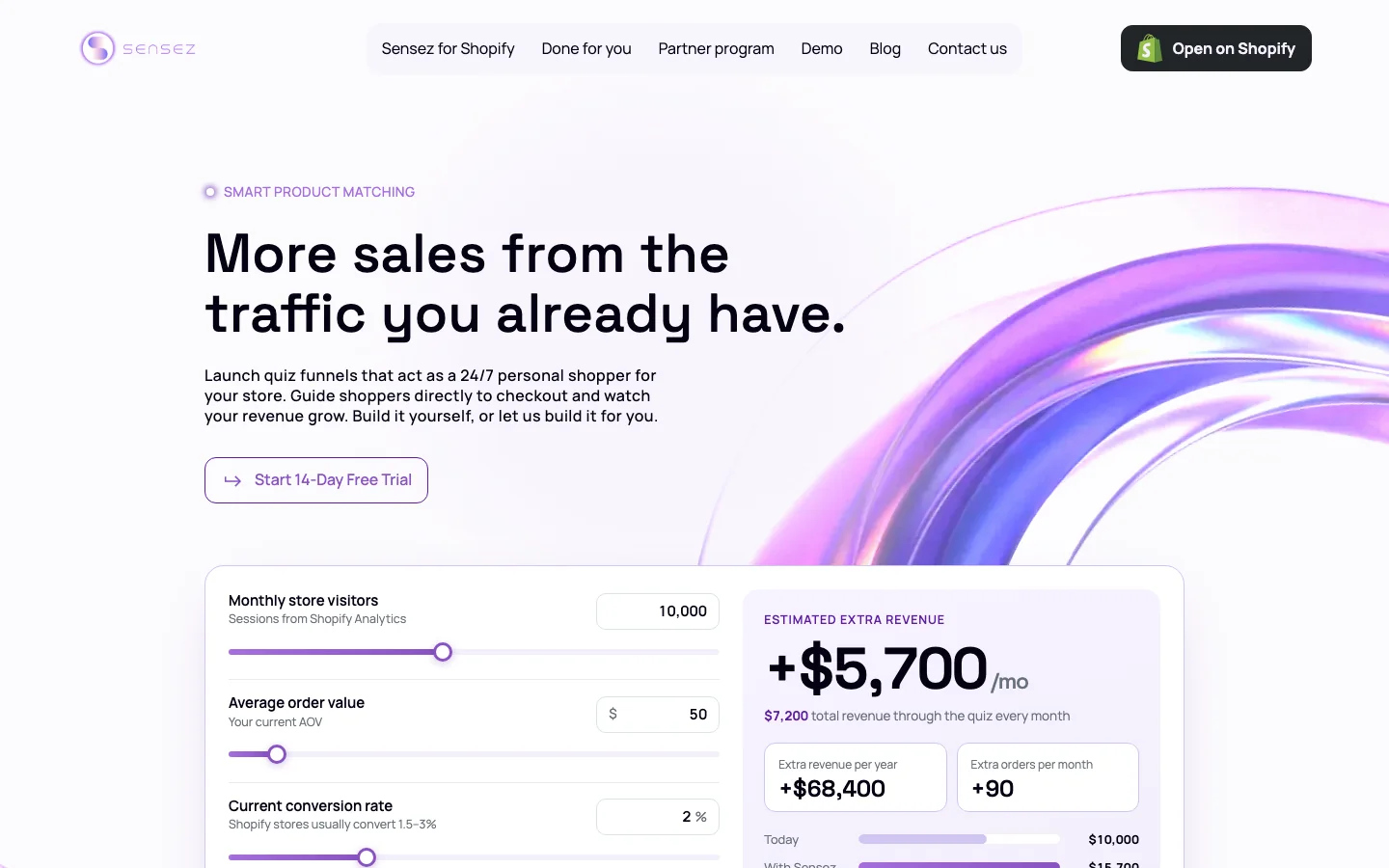
We also built sensez.io. Its revenue calculator estimates the extra monthly revenue a quiz could bring from a store's visitors, average order value and conversion rate.
The site links to the Shopify App Store listing, takes Done for you call bookings and runs a partner program for agencies and CRO experts.
The sensez.io home page with the revenue calculator
sensez.io, with the revenue calculator under the first screen.
12

Lazy Ants builds the product, Sensez runs the business

Ownership boundaries
01
  • Lazy Ants: the Shopify app, the storefront quiz, the result page engine and billing
02
  • Lazy Ants: the theme extensions, the sensez.io website and releases
03
  • Sensez: product direction, plans and prices
04
  • Sensez: merchants, support and Done for you quizzes
Built on what Shopify already provides
Sensez leaves the cart, checkout, subscriptions and payments to Shopify and puts its own work into the part Shopify does not have: matching a shopper's answers to the right products. We take the same approach to any Shopify app or store feature that many merchants must set up without a developer.
Planning a Shopify app or a store feature?
Shopify App Case Study | Sensez Product Quiz